Dark Themed and Soft Toned Jewelry in Outdoor Setting
📝 Prompt
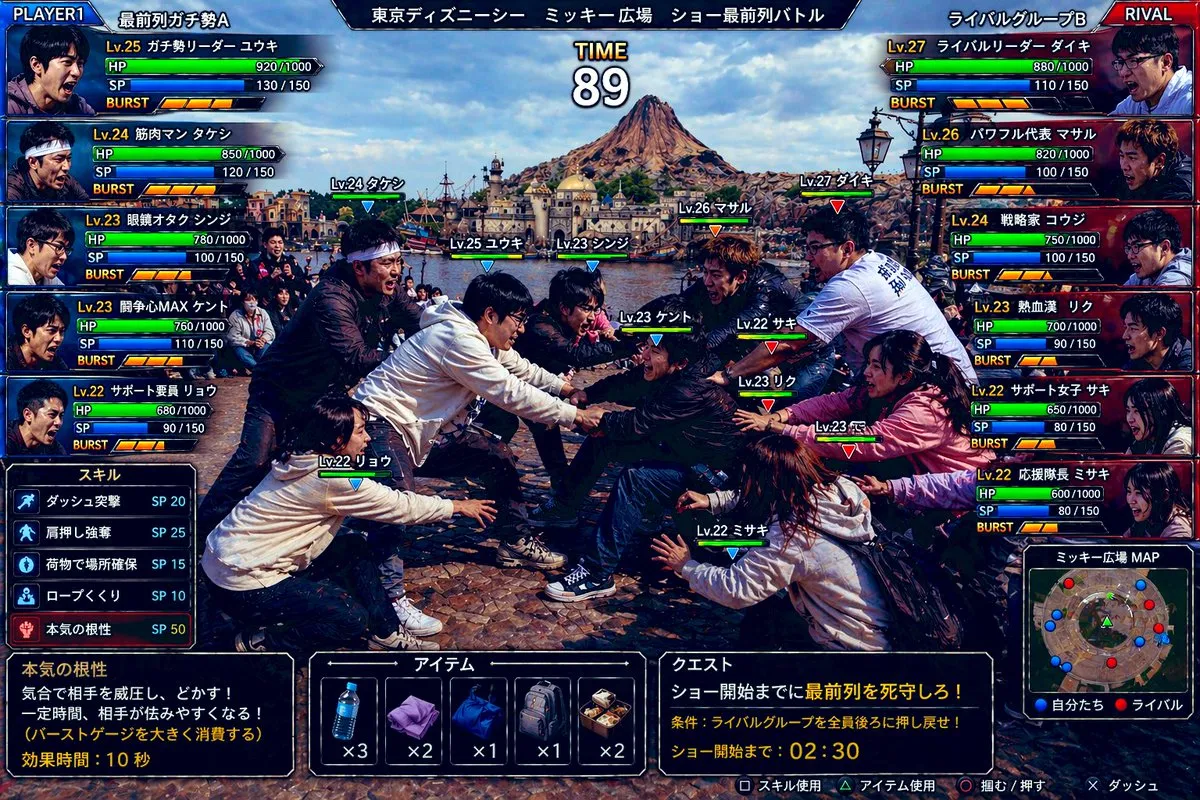
Create a hyper-detailed comedic Japanese arcade fighting game screenshot styled like a versus battle scene, using a real-world photo aesthetic with game UI overlaid on top. The scene shows an intense mock battle between two groups of theme-park fans competing for the front row at an outdoor show plaza in Tokyo DisneySea. Use a wide 16:9 composition. In the background, clearly show Mediterranean Harbor and Mount Prometheus under bright daytime skies, with the waterfront and DisneySea architecture visible. In the foreground, show exactly 10 young adult people in winter casual clothing, split into 2 opposing teams of 5, physically leaning, grabbing, reaching, and shoving in a tug-of-war-like scrum over position, with exaggerated competitive body language and frozen action as if in a fighting game. Faces should be anonymized with soft blurred blocks. Add floating character labels above each person with levels and names in Japanese. The overall tone is absurdly realistic, like a real candid photo transformed into a polished arcade game battle screen.

Add a full Japanese fighting-game HUD with glossy blue-versus-red interface styling. At the very top, place a center stage title bar reading "東京ディズニーシー ミッキー広場 ショー最前列バトル" and a large timer in the middle reading "TIME 89". In the top left, add a blue team header "PLAYER1" and team name "最前列ガチ勢A". In the top right, add a red team header "RIVAL" and team name "ライバルグループB". On the left side, stack exactly 5 blue player status panels with portraits, level, Japanese class-like nicknames, HP, SP, and BURST meters. The 5 left-side labels are: "Lv.25 ガチ勢リーダー ユウキ", "Lv.24 筋肉マン タケシ", "Lv.23 眼鏡オタク シンジ", "Lv.23 開角心MAX ケント", "Lv.22 サポート要員 リョウ". On the right side, stack exactly 5 red rival status panels with the labels: "Lv.27 ライバルリーダー ダイキ", "Lv.26 パワフル代表 マサル", "Lv.24 戦略家 コウジ", "Lv.23 熱血漢 リク", "Lv.22 サポート女子 サキ". Each panel should include numeric HP and SP values and segmented BURST gauges, styled like a Japanese arcade RPG-fighter interface.

Place exactly 10 in-battle nameplates above the fighters in the center scene, color-coded blue for the left team and red for the right team. The 10 labels are: "Lv.24 タケシ", "Lv.25 ユウキ", "Lv.23 シンジ", "Lv.23 ケント", "Lv.22 リョウ", "Lv.27 ダイキ", "Lv.26 マサル", "Lv.23 リク", "Lv.22 サキ", "Lv.22 ミサキ".

At the lower left, add a skill menu titled "スキル" listing exactly 5 skills with SP costs: "ダッシュ突撃 SP 20", "肩押し強奪 SP 25", "荷物で場所確保 SP 15", "ロープくぐり SP 10", "本気の根性 SP 50". Beneath that, add a dark description box explaining the highlighted skill "本気の根性" with the Japanese text: "気合で相手を威圧し、どかす! 一定時間、相手が怯みやすくなる! (バーストゲージを大きく消費する) 効果時間:10秒".

At the bottom center, add an item menu titled "アイテム" with exactly 5 item slots showing icons and counts: a water bottle "x3", a folded purple towel "x2", a blue drawstring bag "x1", a gray backpack "x1", and a boxed meal "x2". At the lower right, add a quest panel titled "クエスト" with the mission text "ショー開始までに最前列を死守しろ!" and condition text "条件:ライバルグループを全員後ろに押し戻せ!" and countdown text "ショー開始まで:02:30". Beside it, add a mini-map titled "ミッキー広場MAP" showing red and blue dots for both teams in the plaza. Along the very bottom edge, include small controller prompts in Japanese for actions such as skill use, item use, grab/push, and dash.

Use dramatic, saturated lighting, crisp detail, realistic clothing folds, authentic plaza stone pavement, and a high-end Japanese game screenshot look. The image should feel like a ridiculous but believable crossover between a real Tokyo DisneySea crowd photo and a competitive arcade battle game interface.
🖼️ Example Output
📖 Prompt Description
This Portrait Photography, Food Photography, UI Design-themed AI image prompt creates a visually striking composition. Create a hyper-detailed comedic Japanese arcade fighting game screenshot styled like a versus battle scene, using a real-world photo aesthetic with game UI overlaid on top. The prompt leverages specific style keywords and technical parameters to guide the AI model toward producing a high-quality result. It works across all major AI image generators including GPT Image, Midjourney, Flux, and Stable Diffusion, though results may vary slightly between models. Each tool interprets the style keywords differently, giving you unique variations of the same creative concept.这个以Portrait Photography、Food Photography、UI Design为主题的AI 图片 Prompt 能够创建视觉冲击力强的构图。Create a hyper-detailed comedic Japanese arcade fighting game screenshot styled like a versus battle scene, using a real-world photo aesthetic with game UI overlaid on top。该 Prompt 利用特定的风格关键词和技术参数,引导 AI 模型生成高质量的结果。它适用于所有主流 AI 图像生成器,包括 GPT Image、Midjourney、Flux 和 Stable Diffusion,但不同模型的结果可能略有差异。每个工具对风格关键词的解读不同,能够为你带来同一创意概念下的独特变体。
🎨 Style Analysis
Visual Style视觉风格
Dark — moody, shadowy atmosphere with deep contrast and dramatic tension暗色调 — 忧郁阴暗的氛围,高对比度和戏剧张力
Mood & Atmosphere氛围与情绪
Intense and powerful, creating emotional impact through contrast强烈而有力,通过对比创造情感冲击
Lighting灯光
Balanced ambient lighting that highlights the subject while maintaining natural-looking shadows and depth均衡的环境光,突出主体的同时保持自然的阴影和层次感
Composition构图
Portrait — vertical framing optimized for subjects竖幅构图 — 垂直画幅,适合拍摄主体
This prompt combines Dark visual elements with Intense and powerful mood. The Balanced ambient lighting that highlights the subject while maintaining natural-looking shadows and depth enhances the overall atmosphere, while the Portrait composition ensures the Portrait Photography, Food Photography, UI Design elements are properly framed. Together these choices create a cohesive visual narrative that AI models can interpret effectively to produce high-quality Portrait Photography, Food Photography, UI Design imagery.该 Prompt 融合了暗色调的视觉元素与强烈而有力的氛围。均衡的环境光,突出主体的同时保持自然的阴影和层次感增强了整体氛围,而竖幅构图的构图确保Portrait Photography、Food Photography、UI Design元素得到合理布局。这些选择的组合创造了连贯的视觉叙事,AI 模型能够有效解读并生成高质量的Portrait Photography、Food Photography、UI Design图像。
🤖 Best AI Models for This Prompt
GPT Image (ChatGPT)
Excellent at following complex prompt instructions for photorealistic results. Handles lighting, composition, and fine details with high accuracy.擅长遵循复杂的 Prompt 指令生成照片级写实效果。在光照、构图和精细细节方面表现出色。
Midjourney v6
Exceptional aesthetic quality and artistic interpretation. Excels at cinematic, painterly, and stylized outputs with stunning visual appeal.出色的美学品质和艺术表现力。擅长电影感、绘画感和风格化输出,视觉效果惊艳。
Flux Pro
Outstanding prompt adherence and photorealistic quality. Excellent at following specific style and lighting instructions precisely.出色的 Prompt 遵循度和照片级写实质量。精确执行特定的风格和光照指令。
Stable Diffusion XL
Highly customizable with ControlNet and LoRA support. Great for iterative refinement and achieving specific artistic styles through fine-tuning.支持 ControlNet 和 LoRA,高度可定制。适合迭代优化和通过微调实现特定艺术风格。
🚀 How to Use This Prompt
- Copy the prompt — Click the Copy button above to copy the full prompt text to your clipboard.复制 Prompt — 点击上方的复制按钮,将完整的 Prompt 文本复制到剪贴板。
- Open your AI tool — Launch Midjourney, ChatGPT, Flux, or your preferred AI image generator.打开你的 AI 工具 — 启动 Midjourney、ChatGPT、Flux 或其他你喜欢的 AI 图像生成器。
- Paste and generate — Paste the prompt into the text input and hit Generate. Wait for the AI to create your image.粘贴并生成 — 将 Prompt 粘贴到文本输入框中,点击生成。等待 AI 创建你的图片。
- Refine if needed — Adjust specific keywords (colors, style, subject) to fine-tune the result. Experiment with variations to get your ideal output.根据需要调整 — 调整特定关键词(颜色、风格、主题)来微调结果。尝试不同变体以获得理想输出。
⚙️ Prompt Parameters
🚫 Recommended Negative Prompt
          blurry, low quality, distorted, deformed, ugly, bad anatomy, watermark, text overlay, oversaturated, cartoon, anime, extra fingers, extra limbs, mutation, poorly drawn face
          模糊、低质量、变形、畸形、丑陋、解剖结构错误、水印、文字叠加、过饱和、卡通、动漫、多余手指、多余肢体、变异、面部绘制不佳
🔗 Related Prompts
❓ Frequently Asked Questions
What AI tools support this prompt?哪些 AI 工具支持这个 Prompt?
This prompt works with GPT Image (ChatGPT), Midjourney, Flux, Stable Diffusion, DALL-E, and other AI image generators. Each model may produce slightly different interpretations — we recommend trying multiple tools to find the result that best matches your creative vision for Portrait Photography, Food Photography, UI Design imagery.该 Prompt 适用于 GPT Image (ChatGPT)、Midjourney、Flux、Stable Diffusion、DALL-E 等主流 AI 图像生成器。不同模型可能产生略有差异的结果——建议尝试多种工具,找到最符合你Portrait Photography、Food Photography、UI Design创作愿景的效果。
Can I modify this prompt?我可以修改这个 Prompt 吗?
Absolutely! This prompt is a starting template. You can adjust colors, styles, subjects, and composition details to match your specific needs. Try changing the lighting conditions, swapping the art style, or adding specific details to make it uniquely yours.当然可以!这个 Prompt 只是一个起始模板。你可以调整颜色、风格、主题和构图细节来满足具体需求。尝试改变光照条件、更换艺术风格或添加特定细节,让它成为你独一无二的作品。
How do I get better AI image results?如何获得更好的 AI 图像效果?
Be specific about style, lighting, composition, and mood in your prompts. Include artist references or technique names. Use negative prompts to exclude unwanted elements. Start with a clear subject description, then layer in details progressively. Iteration is key — generate, analyze, and refine.在 Prompt 中明确描述风格、光照、构图和氛围。引用艺术家或技法名称。使用负面 Prompt 排除不需要的元素。从清晰的主体描述开始,然后逐步添加细节。迭代是关键——生成、分析、优化。
Why use Portrait Photography, Food Photography, UI Design prompts for AI image generation?为什么使用Portrait Photography、Food Photography、UI Design类型的 Prompt 来生成 AI 图像?
Portrait Photography, Food Photography, UI Design prompts help focus the AI model on specific visual elements and styles that are proven to produce compelling results. By using curated prompts from our library, you benefit from tested keyword combinations that consistently generate high-quality Portrait Photography, Food Photography, UI Design images across different AI platforms.Portrait Photography、Food Photography、UI Design类型的 Prompt 有助于引导 AI 模型聚焦于特定的视觉元素和风格,这些已被证实能产生出色的效果。通过使用我们精心整理的 Prompt 库,你可以利用经过验证的关键词组合,在不同 AI 平台上持续生成高质量的Portrait Photography、Food Photography、UI Design图像。
Is this prompt free to use commercially?这个 Prompt 可以免费商用吗?
Yes, you can use and modify this prompt freely for personal and commercial projects. However, the generated images may have different usage rights depending on the AI tool you use. Always check the specific platform's terms of service for commercial usage of AI-generated content.是的,你可以自由使用和修改这个 Prompt,用于个人和商业项目。但生成的图像可能因使用的 AI 工具不同而有不同的使用权。请务必查看各平台关于 AI 生成内容商业使用条款。